Duolingo Local: regional Spanish lessons
overview
Duolingo Local is a feature concept that adds optional, bite-sized lessons on regional Spanish within Duolingo’s existing Spanish course, starting with common Mexican expressions. This case study walks through how I approached the concept, from early research and design decisions to MVP prioritization, implementation considerations, and measuring success.
problem
Duolingo teaches foundational Spanish well, but a learner who finishes several units can still be lost in a real conversation. Regional slang and everyday expressions are what native speakers actually use, and they are the part of the language the course does not cover. The gap shows up at exactly the moment learners care about most, which is talking to someone. Duolingo's own documentation acknowledges that Spanish varies across regions, which makes the case for teaching that variation directly rather than leaving learners to discover it on their own.
target users
I designed for Spanish learners at every proficiency level who want to understand regional expressions and speak more naturally with native speakers. This is a deliberately wide segment rather than an advanced-only one, since a beginner who learns that an expression exists benefits as much as an advanced learner who already recognizes it. Spanish is also the right language to start with, since it ranks first among the languages that attract Duolingo's most dedicated learners.
hypothesis
Giving learners opportunities to practice Spanish that is relevant to their real-world goals will motivate them to complete more lessons. Stating the bet this plainly is what made the rest of the work tractable, because it set a single question for the experiment to answer and kept features that would not move it out of the MVP.
solution
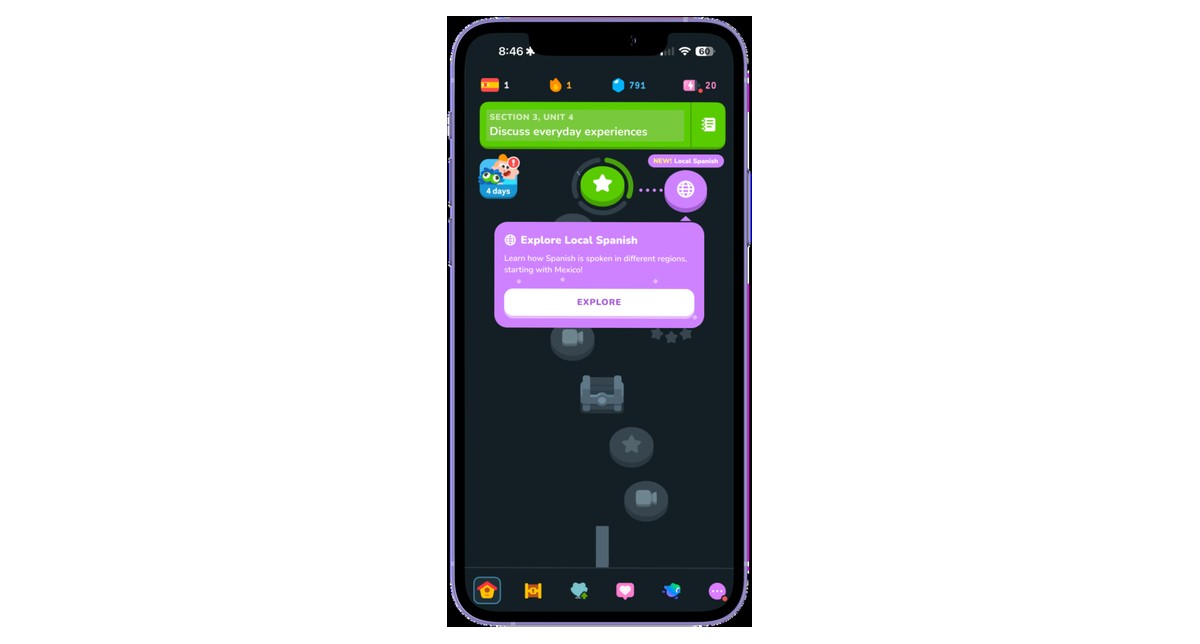
The feature needs to be discoverable without getting in the way of the course someone already signed up for, so I designed the entry point as an optional node beside the existing path:
An optional node on the path
A local Spanish node appears beside the existing course path, so learners find it in the place they already look rather than in a menu.
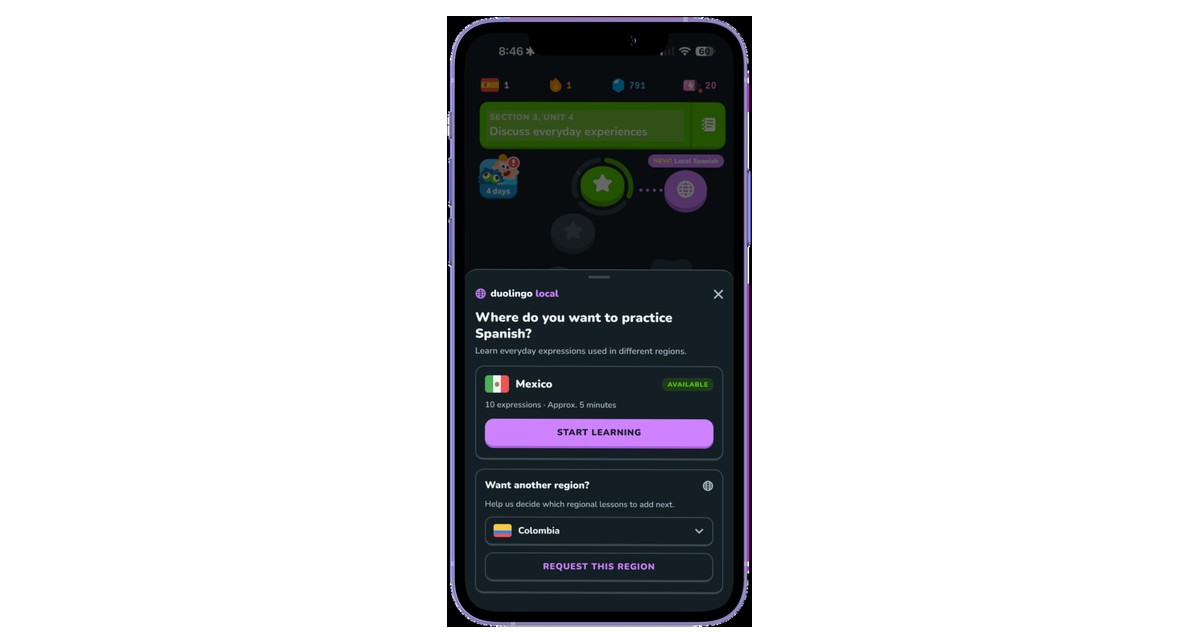
A short popup explains the value
A brief popup introduces regional language learning in one sentence, so a learner can judge whether they want it without opening a lesson.
Explore or dismiss, with no penalty
Learners can dismiss the feature and continue their course untouched, and the entry point stays available if they change their mind later.
what the MVP includes
Scoping this tightly mattered more than usual, since regional content is expensive to produce and maintain. I kept the first version small enough to test the hypothesis and nothing larger:
In scope
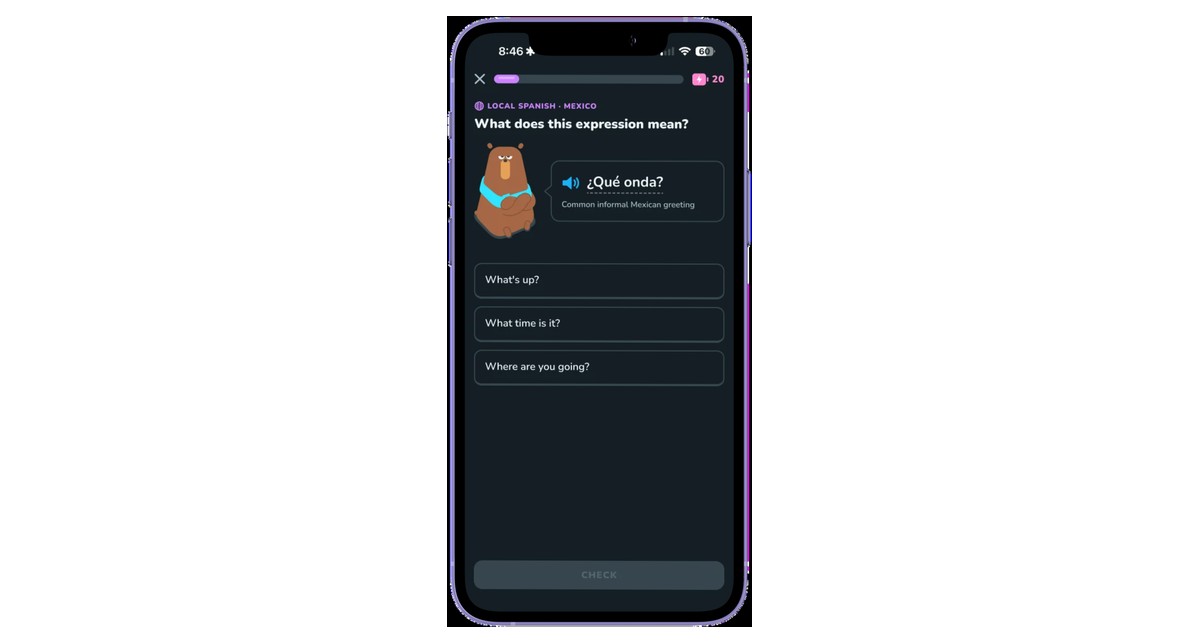
Mexican Spanish, 10 curated expressions, and one lesson of roughly five minutes.
Out of scope
Additional regions, advanced personalization, and AI-powered practice, none of which are needed to find out whether learners want this.
Future expansion
Additional Spanish-speaking regions first, followed by regional variations in other languages once the pattern is proven.
building on what already exists
The MVP is cheap to build because almost none of it is new. Each piece maps onto something the product already has:
Learning path
Lessons are optional and sit alongside the course, so core-course progress rules do not change.
Rewards
The feature reuses the existing XP, streak, and Energy rules rather than introducing a separate reward system.
Development
Audio, multiple-choice, and lesson-completion components are all reused from the existing course.
edge cases
Regional language is the kind of content that goes wrong quietly, since a learner usually cannot tell that an expression is outdated or wrong for their city. I worked through the four failure modes that worried me most and decided how each one would be handled:
| Edge case | Proposed solution |
|---|
| Geographic variation | Label city or state-specific usage when it is relevant, and avoid presenting one expression as true countrywide |
|---|
| Outdated expressions | Schedule periodic native-speaker reviews, then update or retire content that has fallen out of use |
|---|
| Multiple meanings | Accept contextually valid answers and briefly explain the alternatives rather than marking the learner wrong |
|---|
| Social context | Explain formality, audience, and when an expression is appropriate to use |
|---|
Content maintenance runs alongside these: learners can flag an expression as inaccurate or outdated, which feeds the review cycle rather than waiting for a scheduled audit to catch it.
how I would know it worked
I would validate demand before building anything, then run a controlled experiment rather than shipping to everyone and reading the dashboard afterward:
1. Validate before building
Test a clickable preview to gauge whether learners want regional lessons at all, and assess comprehension before and after a lesson to check that the format teaches anything.
2. Run an A/B experiment
Randomly assign Spanish learners to the existing course as control, or the course with Local as treatment.
3. Measure against one primary KPI
Average weekly Spanish lessons completed per eligible learner, which is the metric the hypothesis actually predicts.
the supporting metrics
Three more metrics sit under the primary KPI, each answering a different question about whether the feature is working:
Initial interest
Feature discovery click-through rate, which shows whether the entry point and its popup are doing their job.
Participation
Local lesson completion rate, which separates learners who were curious from learners who found the content worth finishing.
Guardrail
Core-course lesson completion rate, which protects the engagement the feature is meant to add to rather than pull from.
Expansion criteria: increased lesson engagement and comprehension, without harming core-course progression.
back to projects