TikTok sound playlists
overview
TikTok sound playlists is a feature concept that lets users organize their saved sounds into named playlists. I ran a product teardown of TikTok's saved sounds tab, defined the user problem and MVP requirements, and designed mockups that build the feature on top of TikTok's existing Collections pattern.
problem
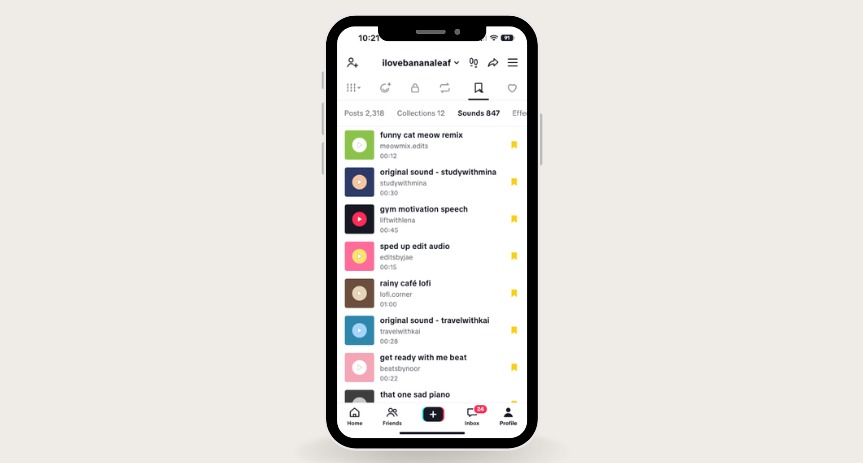
TikTok saves every sound to one chronological list, with the most recent sound at the top. For anyone who saves sounds often, that list quickly grows into hundreds of entries with no way to group them, so finding the right sound for a video means scrolling back through everything. Saved videos already solve this problem with Collections, but saved sounds have no equivalent.
target users
I designed for frequent TikTok users and creators who save sounds to use later, whether for a specific trend, a recurring series, or a certain mood. Sound choice sets the tone of a video, so these users need to find a sound that fits the vibe quickly, often while they are in the middle of making a post.
pain points
Tearing down the current saved sounds flow surfaced 3 points of friction. The list only sorts by date saved, so older sounds get buried, there is no way to group sounds by mood or project, and users have to rely on memory to find something they saved weeks ago. These became the MVP's requirements: let users group sounds, find a saved sound quickly, and manage those groups without learning a new interface.
solution
I built the feature on TikTok's Collections pattern for saved videos, so it feels familiar to users and reuses create and manage flows the team already maintains. I scoped the MVP to 3 core features:
Playlists on the Sounds tab
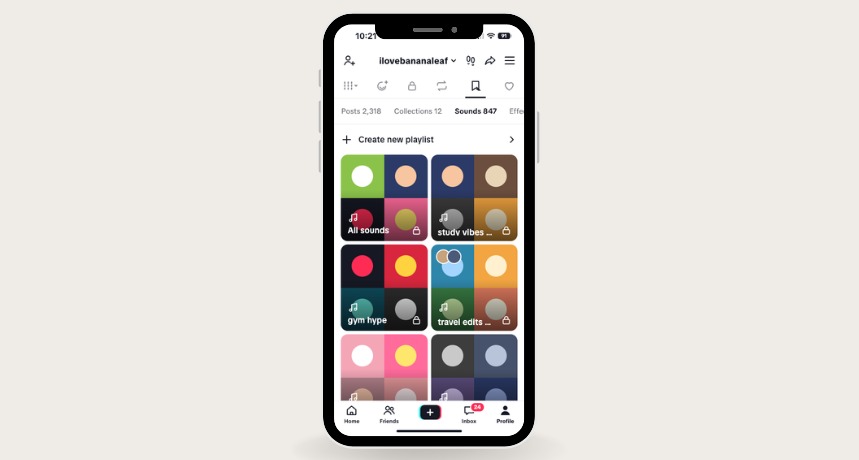
Saved sounds are grouped into playlist tiles with a four-cover grid, and an All sounds tile keeps the original list as the first option.
Create a playlist in one sheet
The same bottom sheet used for Collections lets users name a playlist, share it with a friend to build together, and choose whether it shows on their profile.
Manage it like a collection
A Manage menu lets users add or select sounds, rename, change the cover, make it public, or delete it. Add sounds opens TikTok's sound library with Trending and Your sounds tabs.